
Summary of Power Platform vibe coding tools

I’ve gone over the Power Platform’s vibe coding tools in separate posts. This time it’s time for a summary. What are each of the options good for? What are their shortcomings? Which one do I like the most?
There are a breathtaking number of tools available.

Let’s start dismantling them!
Plan Designer
Plan designer isn’t really even a vibe coding tool. It doesn’t write code. And the process isn’t particularly iterative.

Plan designer can work on the basis of a prompt
- describe user roles and their requirements
- create a process diagram from the application
- create the necessary data model
- create model-driven and canvas Power Apps
In the data model, plan designer can utilize (at least helpfully) Dataverse’s standard tables (e.g. systemuser) and it easily creates a model-driven application with forms and views. The canvas Power Apps it creates is the same standard application that can be automatically created based on a single table. A good starting point for some, but it’s not a great application.
Currently, plan designer is useful for starting to build a lightweight application. You can quickly create a data model, create tables, and a model-driven application for maintaining data.
Plan designer is more of an AI-assisted configuration tool than a vibe coding tool
App Builder (preview)
App Builder, on the other hand, is vibe programming at its purest. You only have a chat window to ask App Builder to build your app and make changes to it. It’s not even possible to peek at the code generated by the tool.

App Builder is essentially an agent running in M365 Copilot. Its use requires an M365 Copilot license. It is the only tool that uses SharePoint lists as a data repository. The biggest shortcomings of App Builder are related to the use of lists.
- When building an app, App Builder always creates a new SharePoint site and the lists needed by the app.
- After this, the lists will not be changed. If a new feature of the application requires new lists or changes to existing ones, you will be guaranteed to get the agent and thus your application into the node.
App Builder is also definitely the slowest of the platform’s vibe programming tools.
As such, I don’t see much use for this. If the lists used by an application created with App Builder could be modified afterwards, it would be a great game to replace simple canvas Power Apps made by citizen developers. They are typically applications built on top of 1-3 lists. But even those are usually subject to changes during their lifecycle that require adding new columns to the lists. And App Builder is not yet flexible enough for this.
Of course, it would be great if you could add new lists to the application later. Or if you could build the application on top of existing lists in the first place.
Well, you can’t have everything. However, App Builder is so limited that I’m not really warming up to it yet.
Generative Pages
Generative Pages is the most versatile and fastest (and oldest) of the platform’s own tools. In addition to viewing the code it generates, you can also edit it (why on earth would I want to) and compare it to the previous version. Compare is a handy feature. It allows you to quickly see how much of the code the agent has rewritten when making the change you requested.

But…
Generative Pages can only be used to create individual pages that are embedded in the navigation of model-driven apps. It cannot be used to create standalone applications. I have also not found a way to open a page created this way (with context) from a model-driven app form. You can do this the other way around, i.e. open a model-driven app form from generative pages.
The pages created with Generative Pages are too limited to use for my taste.
Vibe Power Apps (preview)
Vibe Power Apps looks suspiciously like Plan Designer. As if it had been separated from Plan Designer into its own entity.
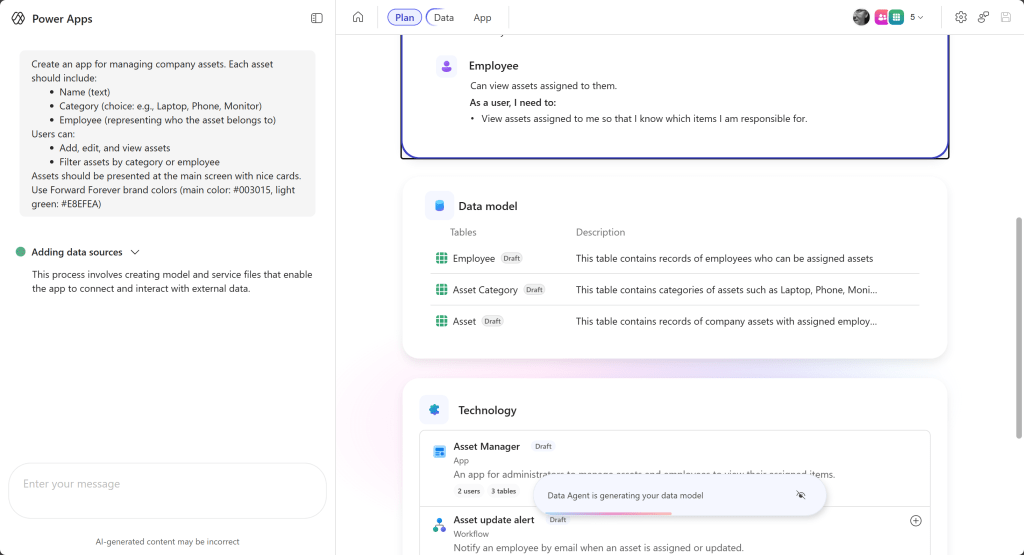
Vibe Power Apps is reasonably fast and produces modern-looking applications.
Its special feature is building visually appealing applications, but full of unnecessary graphical elements. Below is a picture of the asset management tool. There is no asset list at all on the main page. Instead, we have 5 different places where you can create a new asset.

The biggest problem with Vibe Power Apps, however, is the data model it creates. It can’t (yet) utilize Dataverse’s ready-made tables. You can modify the data model afterwards, but I’ve never been able to get it to use existing tables. The application just stops working after the change.
And even if this shortcoming could be fixed (and I wonder if it can be, plan designer initially worked the same way), it would still have the same problem as Generative Pages. Vibe Power Apps can only be used to create standalone applications.
What I really need is a vibe programming tool that can be used to create both standalone applications and custom page-style model-driven app extensions.
My guess is that generative pages, plan designer, and vibe Power Apps will merge at some point. And that’s fine.
Power Apps Code Apps (preview)
Power Apps Code Apps is my absolute favorite of the tools available. The comparison is not entirely fair, though. The tools reviewed above are part of the platform. They don’t require anything to be implemented (except a Power Apps / M365 Copilot license if you don’t already have one). They are designed for anyone to use.
Power Apps Code Apps, on the other hand, is full-fledged software development. The work is done in a development environment tuned for your own workstation using established software development tools. For those working in IT or otherwise interested, it’s not overwhelming. But I can’t see my own mother making small applications with this setup.

Unlike when I started with my own vibe tools, I could imagine making even complex applications with this. The code is version controlled, so you can define your own restore points. You can go back to exactly the version you had at any given time. Unlike previous options, where you ask the language model to revert to the previous version.
The work is fast and you can choose which language model you use. You can proceed in the way you want. Through the definition and technical plan made using the language model to the phased implementation. Or directly to the first version and freely iterate from there.
The style is free.
An excellent tool for creating standalone applications. Same flaw as with generative pages and vibe Power Apps. I wish these could be used easily as part of model-driven apps, like custom pages. For example, in dialogs.
Summary
The platform’s own vibe coding tools are all still more or less unfinished. I believe their number will also decrease at some point.
But Power Apps Code Apps makes clear the potential of LLM-based development. These tools should not be ignored, but should be included in your toolbox.