
Vibe coding with Power Platform – Power Apps Code Apps

Power Platform offers several different ways to vibe code. Generative pages and Vibe Power Apps have been covered in previous articles, so this time we’ll delve into the crown jewel of vibe code in Power Platform. Namely, Power Apps code apps.
What the heck is Power Apps code apps?
Power Apps code apps is a new concept (in preview). It allows you to run your own web applications in the Power Platform environment. In practice:
- you can freely create the application using the editor of your choice (e.g. VS Code) and software framework (e.g. react)
- the user of the application is automatically identified by the platform
- you can use Power Platform connectors
- The application is installed in the Power Platform environment, making it, like other Power Apps, within the scope of the environment governance tools.
The perfect framework for Power Platform vibe coding!
What do you need to get started?
If you are not familiar with modern programming tools, getting started can seem daunting. You will need the following tools for your workstation:
- Visual Studio Code (a great free code editor)
- Node.js (this is needed to manage the necessary packages, npm)
- Git (version control, e.g. code apps template is downloaded from a public git repo)
- Power Apps CLI (command line tool to access the Power Platform environment)
Additionally, the Power Platform environment you are using must have Power Apps code apps enabled.

You also need an agent. I use Github Copilot.
Example – Interactive Gantt Chart
Using the same example from the previous vibe coding article, we will create an application that can schedule visits (Work Appointments) to work orders. The visits are visually displayed in a Gantt chart. Visits can be rescheduled by dragging them from one place to another on the timeline.
Let’s get started!
Below is a sped up and edited video (~8min) of vibe-coding an asset management application in a similar way to the interactive Gantt chart in this article. If you prefer to watch the video!
VS Code – Project Preparation
Let’s create a folder for the project (BlogPostDemo) and open it in VS Code.

Run the command in the terminal
npx degit github:microsoft/PowerAppsCodeApps/templates/vite BlogPostDemoThe command retrieves the Power Apps code apps base from GitHub.

Move to the created folder
cd BlogPostDemoLet’s authenticate to Power Platform using PAC (Power Platform CLI).
pac auth create
Let’s move to the desired environment.
pac env select --environment [environment id]
Installing npm
npm installLet’s tell pac what our application name is.
pac code init --displayname "BlogPostDemo"
Everything is ready, we can start the local server and see what the application looks like.
npm run devAfter executing the command, you will see the address where the application is running.

The application looks like this.

The actual development work can begin!
User interface implementation
I leave the implementation to the agent. I use Github Copilot in agent mode. Used language model is Claude Sonnet 4.5.

The starting prompt is the same as in the previous article.
Change this app to be like the following:

Make app for user to schedule work appointments. I like to have Gantt style view showing work appointments.

- By default view should show appointments for next 7 days.
- User can easily add new appointments and edit existing ones (clicking appointment opens the edit form).
- But user should also be able to drag appointments on gantt view. Whole appointment to new location or just drag from the beginning or the end of appointment.
The agent codes his time and finally states that everything is ready.

Unfortunately, the app just looks like a blank page.

However, there is no need to worry. This is normal and part of the spirit of the game. If something is not working (at all or in the desired way), the agent is asked to fix it.

This is how the first version of the application (more specifically, the application’s user interface) looks like.

Next, the agent is asked to make small changes until the user interface meets the requirements. It is then worth testing from time to time that all the features still work. They sometimes break down when the agent is busy. But by asking nicely (sometimes you have to ask several times), the agent will eventually be able to fix them.
Example of an error.

Copy the error message to the agent and they will quickly find out what’s going on.

The basic features are quickly assembled.

Connecting your app to Dataverse
The created application is not yet connected to the correct data warehouse. The user interface has been developed and tested using demo data.
Next, we ask the agent to replace the demo data with Dataverse tables.
In this environment i have tables for
- Work appointments (tp_workappointment)
- Work Orders (tp_workorder), use this for projects
- users (systemuser), use this for engingneers

Can you use these instead of mockup data?

Use connectors like described here: https://learn.microsoft.com/en-us/power-apps/developer/code-apps/how-to/connect-to-dataverse
This step usually requires a bit of practice (e.g. with Lookup fields). It may be easier to start the whole thing by adding the necessary tables to the application.
Sometimes the agent asks to test and copy log data from the browser console. This time too.

But those meetings will eventually come from Dataverse.

Deploy your app to Power Platform
Deploying your application to the desired environment is easy. All you have to do is ask.
build the app and deploy it into power platform environmentAfter a few attempts, the agent will be able to compile the application.

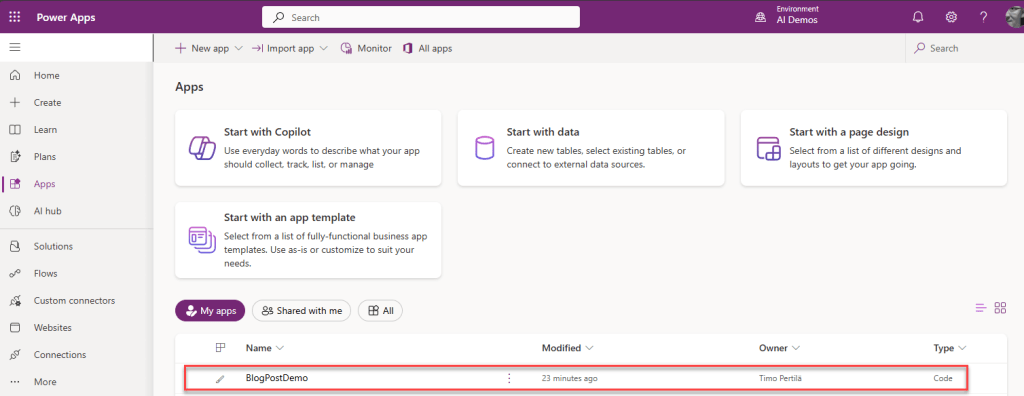
And finally taken to the right environment.

Rest there!
The end result, after a little fine tuning, looks like this.
Summary
There is a threshold for deploying Power Apps Code Apps—at least when compared to the ready-made generative pages and vibe Power Apps functionalities available on the platform. It takes a little extra effort to get started.
In return, you get a full development environment, version control, and the ability to use an agent and language model of your choice. The end results seem better than those made with the platform’s own stripped-down vibe coding tools.
You can also vibe however you want. In the example, we started with a simple prompt and made a mockup, which was iterated in small batches. Finally, the application was connected to Dataverse. But you can also use the agent to first make proper specifications and based on them, an implementation plan. Which the agent then starts to implement in the pieces you instructed.
Or some other way to proceed. The choice is yours.