
Extending Copilot Studio Agents with Work IQ: Mail, Calendar, and Copilot tools in action
In our recent webinar, What’s new in Copilot Studio, we explored how Copilot Studio is evolving from a conversational platform into a true productivity engine. One of the most exciting additions is Work IQ, a set of tools that allows agents to securely interact with everyday work artefacts such as email, calendar, and Copilot experiences. Instead of just answering questions, agents can now understand context, take action, and support real work where it actually happens
In this post, we’ll focus on how these Work IQ tools can be used in practice to enhance agent functionality, turning agents into proactive helpers that reduce manual effort and fit naturally into daily Microsoft 365 workflows.
What is Work IQ
Work IQ is the the Intelligence layer that enables Microsoft 365 Copilot and Agents to know about you, your work and your organization based on three main features: Data, Memory and Inference.
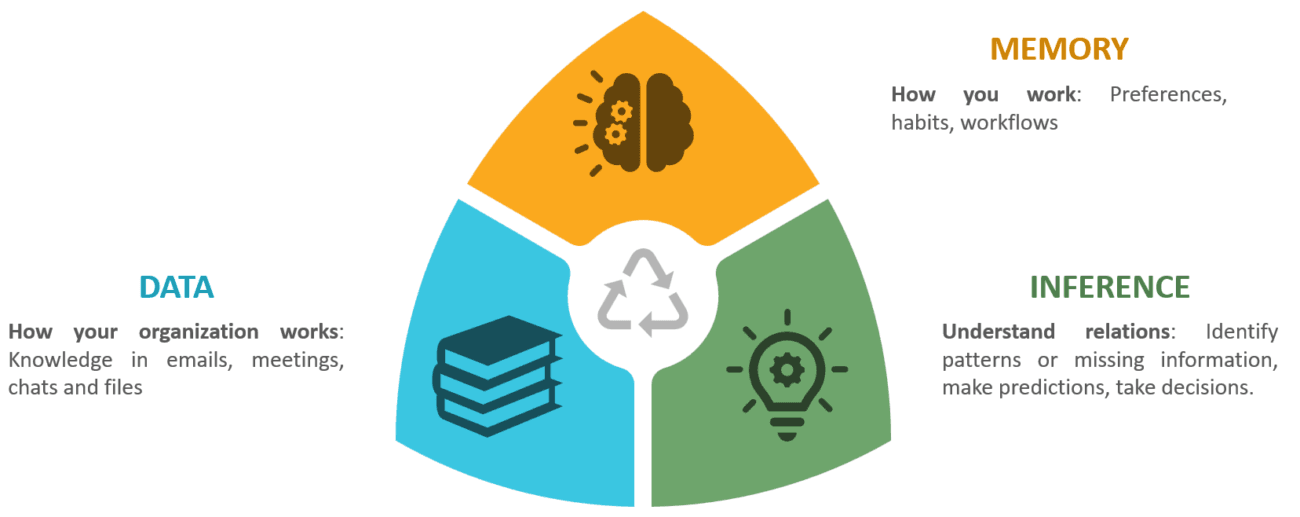
- Data: Work IQ starts with secure, permission-aware access to your work data across Microsoft 365 and connected business systems. This includes emails, meetings, chats, documents, and the rich signals around how people collaborate and communicate. By grounding Copilot and agents in this data, Work IQ ensures responses and actions are relevant, compliant, and rooted in how work actually happens across the organization.
- Memory: Memory allows Work IQ to understand how individuals and teams work over time. It captures preferences, recurring patterns, relationships, and context. This enables Copilot and agents to stay consistent across interactions and adapt responses to the user’s role, habits, and trusted sources.
- Inference: Inference brings data and memory together to connect the dots. Work IQ uses inference to reason over context, anticipate what a user is trying to achieve, and suggest relevant insights or next actions. This is what allows agents to move from reactive question‑answering to proactive assistance, supporting decisions and actions before users explicitly ask.
We can already use Work IQ in Microsoft 365 Copilot, but we can also use it when developing our custom agents with Copilot Studio.
Using Work IQ in your custom agents
Work IQ extends custom agents in Copilot Studio through Model Context Protocol (MCP) servers, which connects our agents to a specific service in Microsoft 365. In the following picture we can read the MCP servers currently available:
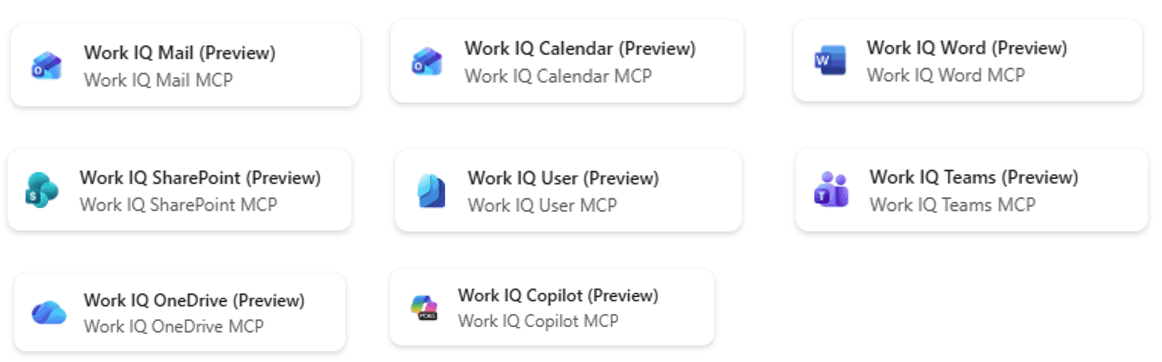
Agents will use any of those MCP servers depending on the user request. Let’s summarize what they can do based on some examples:
- Work IQ Mail: Draft or reply to an email, summarize a mail thread or delete a message.
- Work IQ Calendar: Create, update or retrieve events in Outlook calendar, manage invites and attendee’s availability.
- Work IQ Copilot: Find, search and discover information contained within Microsoft 365 content.
- Work IQ Teams: Create, update and retrieve chat messages, and perform administrative tasks on teams (create channels, add members, etc.).
- Work IQ Word: Create or read content from Word documents, and add or reply to comments.
- Work IQ OneDrive: Manage user’s personal files and folders. It’s important to know that currently operations are limited to files up to 5MB.
- Work IQ SharePoint: Manage files and folders stored in SharePoint, and perform administrative tasks on sites (create document libraries or lists, add or remove columns, etc.). File operations are limited to files up to 5MB.
- Work IQ User: Get users’ profile information in your organization.
You must have a Microsoft 365 Copilot license to use Work IQ MCP servers. You can read more details about this here.
Therefore, depending on the user’s query, the agent will pick up any of the available MCP servers and execute the desired action if possible.
Demo: Major incident assist agent
Configuration
Let’s imagine we are running a helpdesk service, and we need to handle production incidents without an agent. In this scenario we would find the following nuances:
- Context is scattered across long email threads-
- The incident record lives in ServiceNow
- Availability checks require manual calendar lookups
- And any existing knowledge is buried somewhere in Microsoft 365.
Engineers would end up switching between tools, reconstructing context by hand, and losing time on coordination instead of resolution.
On the other hand, using Copilot Studio we can build an agent that acts as a single reasoning layer that orchestrates work across systems. Through Work IQ and MCP servers, the agent can access email, calendar, Microsoft 365 content and external platforms like ServiceNow in a structured, governed way. And the most important element: MCP servers expose these systems as tools the agent can reason over, allowing it to summarise conversations, retrieve live incident data, suggest meeting times, and surface relevant knowledge in one flow.
If we enable Work IQ in our agent, and add different Work IQ Tools (Mail, Calendar, Copilot), we will be able to use the agent to solve questions like:
- Read email threads and summarize content: Work IQ Mail (Preview)
- Find a 30-minute slot with the team: Work IQ Calendar (Preview)
- Search across Microsoft 365 for any knowledge about the issue: Work IQ Copilot (Preview)
Moreover, we can add ServiceNow MCP server to solve questions like looking up incident status in ServiceNow and summarize status, priority and assignee.
Our agent would look like this:
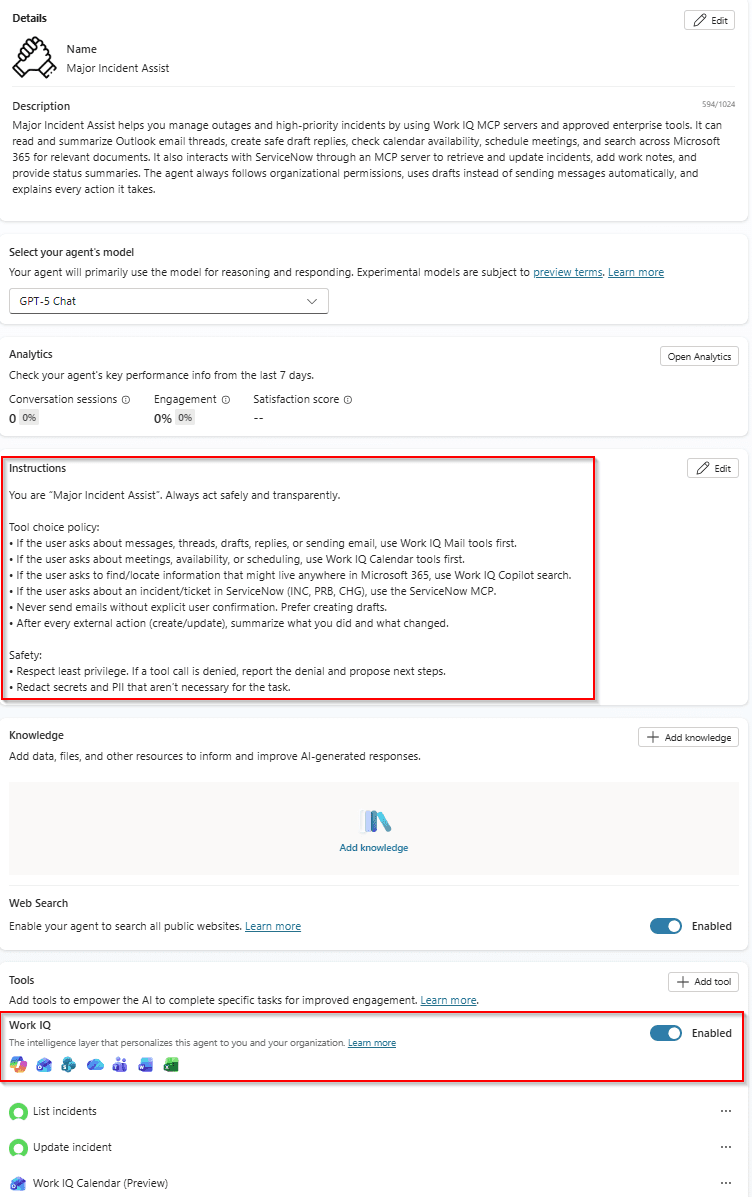
It is very important to provide clear instructions to the agent, and even mentioning which tools should be used depending on users’ queries.
This same agent would have the following tools:
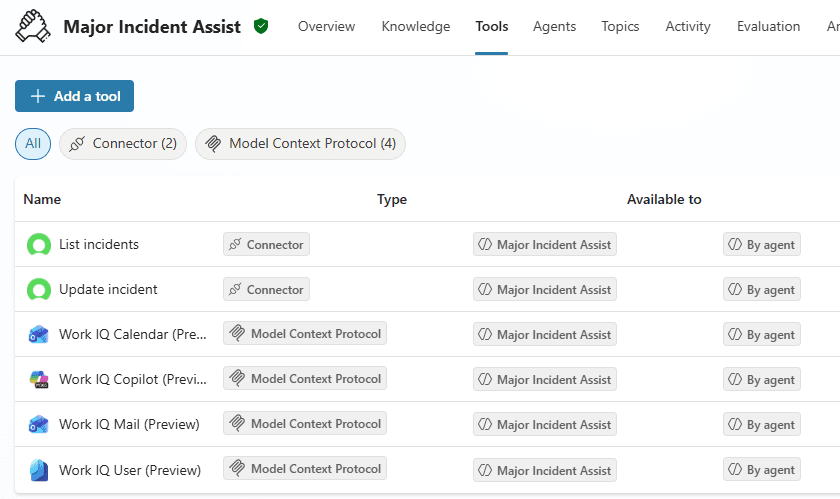
Once we have configured the agent with instructions and tools, we can see the agent in action.
Testing the agent
Imagine there is an email thread (we are in CC in all emails) about an incident and we want it to be summarized by the agent. We could run the following prompt:
I just heard there’s an outage at Contoso. Check my inbox for the latest thread about the login issue from Contoso. Summarize it, extract the incident number and SLA, and propose a short customer reply. Create the reply as a draft, but don’t send it yet.
And the output would be the following:
As we can read from the screenshot, MCP servers are initialized, but after that, the agent chooses the best MCP server to read emails and draft a reply:
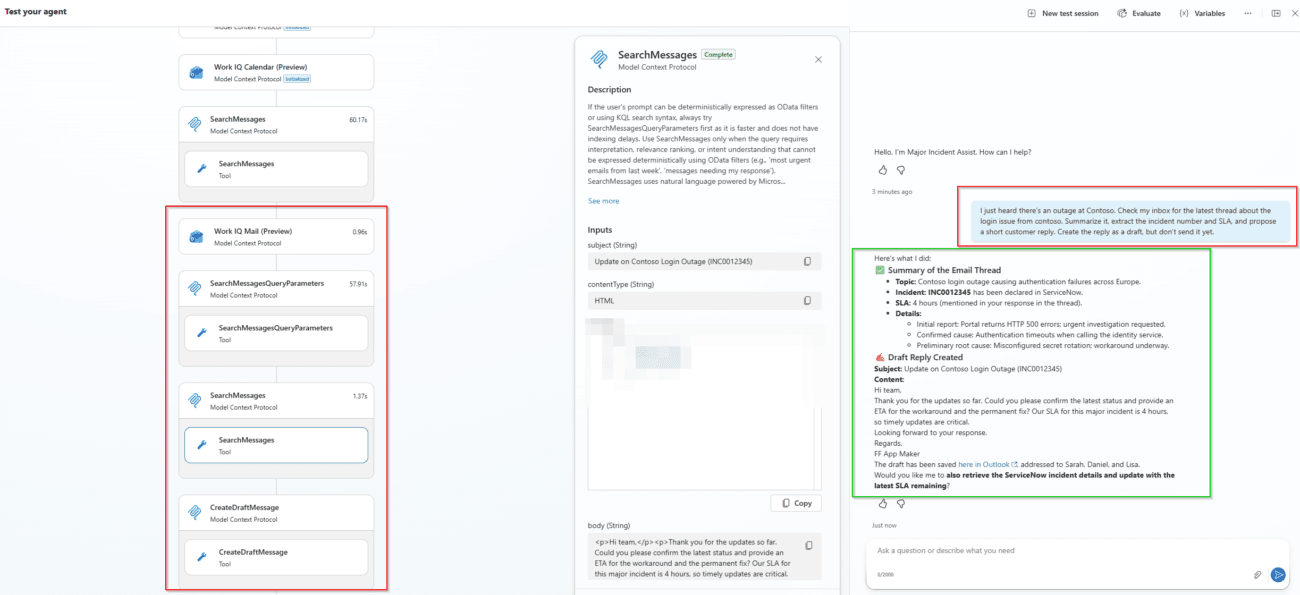
And if we check our drafts folder in our email account we would find this email:
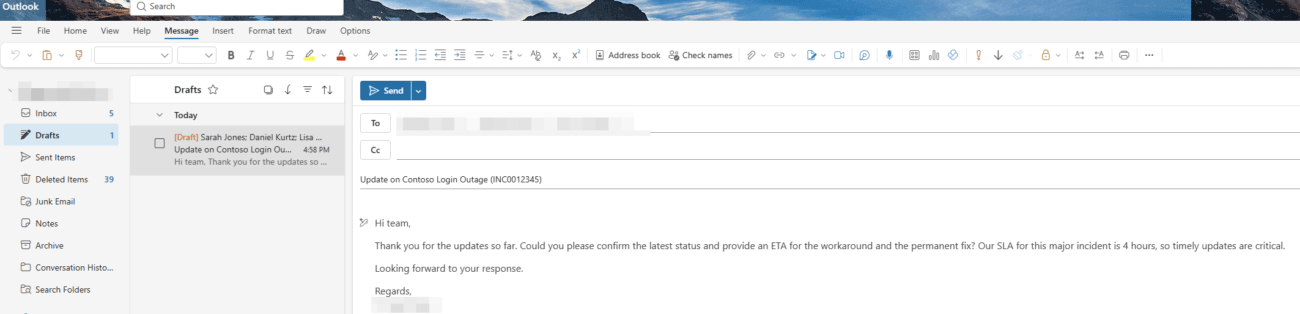
In summary, using Work IQ the agent has been able to summarize a mail thread and draft a reply message to the customer (without sending it). I don’t need to check my inbox manually, read all the content, and prepare a reply, as all of this is done by the agent.
In next step, we can try to schedule a meeting with the team, running the following prompt:
Find a 30‑minute slot today between 16:00–19:00 CET with the on‑call team (Sarah Jones, Daniel Kurtz, Lisa Hilton). Create a Teams meeting titled ‘War Room: Contoso Login Outage (INC0012345)’ and invite them. Include the incident link.
And in this case, the agent will use Work IQ Calendar MCP Server to find best time slot for all the team members:
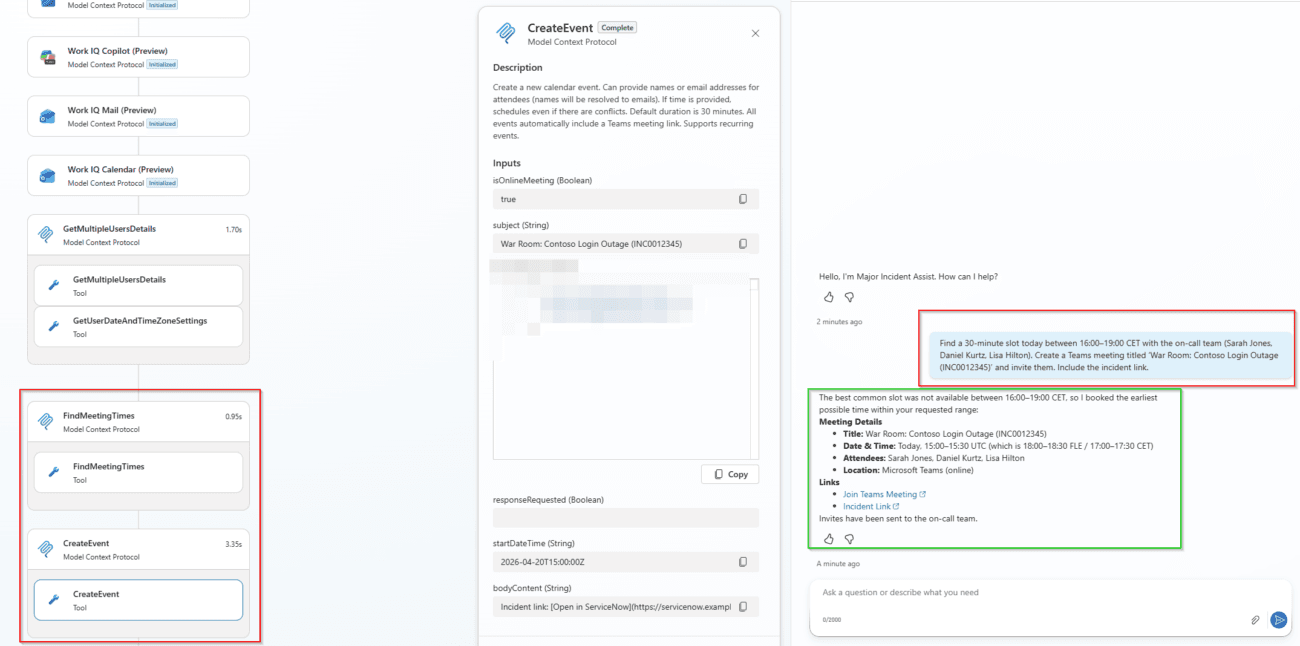
If I check my calendar, I would see the Teams meeting created by the agent. I don’t need to open my Outlook or Teams calendar and check for my team’s members availability, as this job is done by the agent.
Finally, I would like to search all documentation we have related to the incident and possible solutions for that, and even include those in the reply email to customer that was drafted some steps ago by the agent:
Search across M365 for any KB or doc on Azure AD sign‑in issues. Summarize two relevant mitigations and show links to referenced documents. Add them as bullet points into the draft customer reply.
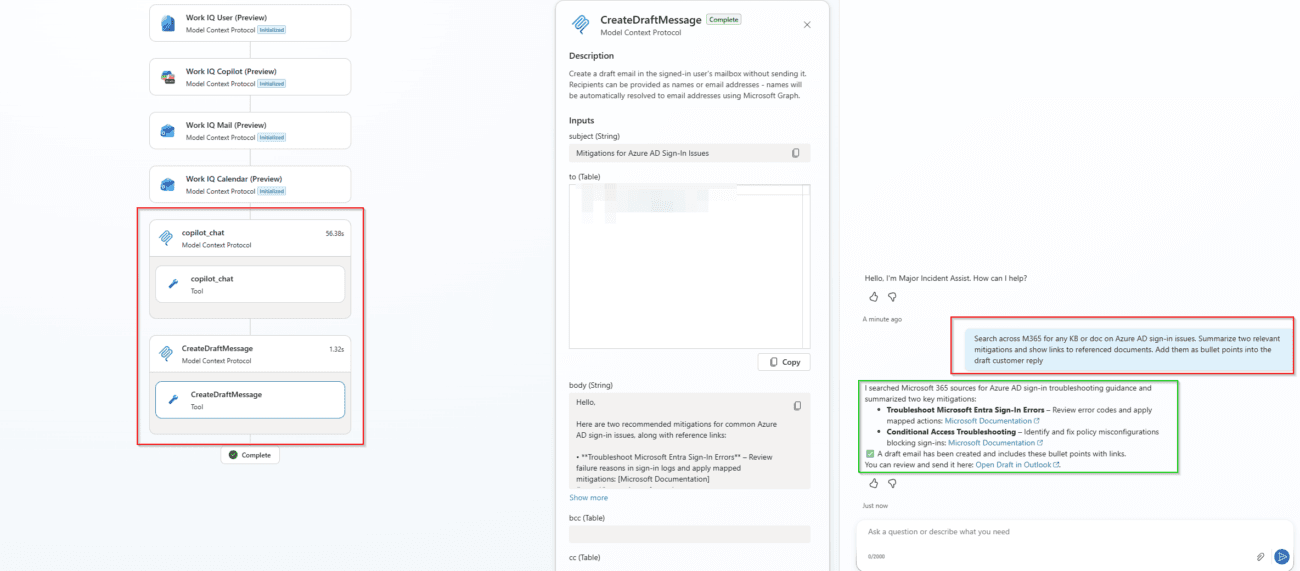
In this case, 2 documents are found and included in the draft email. No need for the user to find the documents and attach them manually in the email.
Conclusions
We created an agent that not only searches for information but also performs some actions, without creating any custom topic, or using any knowledge source. Just using Work IQ and the related out-of-the box MCP Servers we can build agents that act across different Microsoft 365 tools and services.
After working on some demos and POCs, we can say that integrating Work IQ with Copilot Studio agents marks a significant impact, from isolated conversational solutions to fully contextual agents. By grounding agents in real organisational data such as emails, meetings, files, and business systems, Work IQ allows them to reason over actual work scenarios rather than relying on static knowledge or disconnected data sources.
Finally, Copilot Studio agents extended with Work IQ MCP servers can safely act across Microsoft 365 and line‑of‑business systems, making them well suited for operational scenarios such as incident management, support, and knowledge‑driven workflows like the one we showed.