
Where Does the AI End?

An “End-to-End AI Solution” may sound like a cutting-edge technological achievement in today’s market, but it’s often sloppy design.
Good architecture is about choosing the right parts for your solution, every step of the way.
Modern artificial intelligence is a new, constantly changing technology, and the struggle to adopt it to improve your organization is real. “How do we start using AI?” is on everyone’s lips, but for AI architects and designers, another equally important question looms: “Where does the AI end?” The question isn’t a call to stop using AI but a challenge to use it more efficiently.
Artificial intelligence can perform many tasks typically handled by traditional automation. However, it rarely does so as efficiently, introducing heavier compute costs, ongoing maintenance, reduced speed and reliability, and diminished security. An “End-to-End AI Solution” may sound like a cutting-edge technological achievement in today’s market, but it’s often sloppy design. The most powerful AI solutions are carefully scoped, leveraging artificial intelligence for tasks only it can do, while keeping other components fast, cheap, and reliable by leaving them to traditional workflows.
For those looking for ways to better refine their AI flows using classic compute tools, this blog provides an overview of the limitations of AI components, highlights the places AI components excel, and finally offers some good rules of thumb for deciding when to use AI in your processes (and when to turn its job over to something else).
Why AI Must Stop
AI can do many of the things traditional code and logic flows do, with key advantages. Switching from a traditional code approach to an AI-based one opens up new possibilities. However, it also brings significant downsides.
In particular, you’ll give up:
- Cost: AI processing is expensive, and costs increase daily. Traditional compute runs for only a tiny fraction of what you spend on tokens. Further, AI solutions may incur additional maintenance costs, tweaking prompts and operating parameters when your provider updates the underlying model.
- Reliability: Modern AI is probabilistic: A single input does not guarantee a certain output. For simpler workloads, good engineering and retry logic can help make that reliable enough, but in dynamic task execution, the model can always surprise you. Traditional logic flows are deterministic: One input yields one output, every time.
- Speed: AI flows do in seconds what deterministic code does in milliseconds. That latency adds up.
- Security: Your AI processes retain all the attack surfaces and potential vulnerabilities of a deterministic solution while adding new ones. They add network connections and often new supply chain elements, widening the attack surface. Plus, whatever else might go wrong with your cloud flow or Python script, they’ll never become misaligned or succumb to a prompt injection attack.
Imagine opening a calculator app on your device. You hit “1+1” and submit. The app will always say “2,” and it will answer almost instantly. Do the same thing in an AI chat, and the model will almost always say “2” eventually. Add in considerations about how much processing power each uses and how difficult it would be for someone else to tamper with the answer, and it should be obvious what you should favor when you want to do math. Similar principles underlie much of your automation.
To minimize these downsides, look for opportunities for the AI portions of your process to stop and hand their work off to traditional computing.
What is AI for?
Despite the tradeoffs, AI forms a crucial part of many modern workflows. Far from avoiding AI entirely, you should scope your AI contributions to portions of the flow with:
- Ambiguous/Dynamic Routing: Cases where the series of steps cannot be determined in advance or restricted to a set of predefined options make AI a must. Coding and research agents are classic examples. No amount of deterministic logic can predict the sequence of steps a code agent will need to follow to achieve its goals.
- Processing Human Data: Cases where the process needs to handle human data, such as prose, images, or audio, are also go-to cases for AI. Traditional scripted logic typically struggles, or outright fails, to parse or process these kinds of inputs.
- Translating Human/Machine Data: Cases where data either starts in machine format and must end up in human format, or vice versa, lie at the intersection of the two cases above and often also need AI. Logical scripts can often translate simple datasets if the format is predictable, but summarizing a database query or producing JSON from an audio clip is a classic AI task. This one is also the most applicable to well-scoped workflows that use AI touchpoints rather than AI ownership (see below).
The Shortest Path to Numbers
When deciding how to scope the AI component of your workflow, a good rule of thumb is to look for the shortest path to the numbers.
In other words, look for a way to get from ambiguity to structure as quickly as possible, then let a traditional logic flow take over.
For example, say your workflow involves extracting key information from a PDF, classifying the document based on that extracted information, and then executing a logic path based on that classification. Consider each step to determine whether it actually needs AI. First, can traditional OCR reliably extract the information? If so, use it. If not, that’s an AI step. Second, can you classify based on rules you can express in code? If so, do it in code. If not, let the AI handle it. Finally, choosing the logic path based on data you defined and classified is almost always a matter for traditional workflow logic.
Often, the AI is done the moment your work can be represented as structured data.
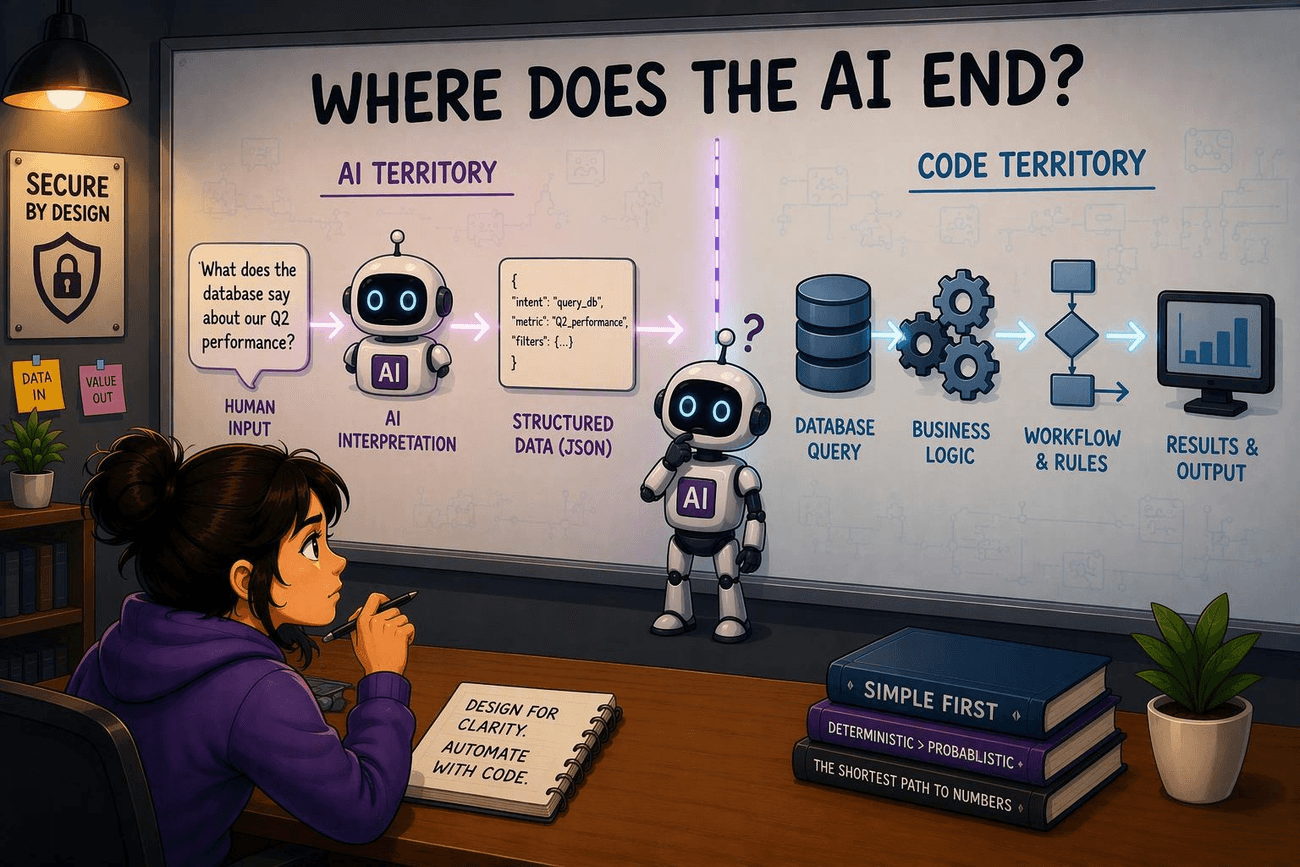
Another quick rule of thumb is to design it first, then look for ways to cut the AI out.
In many cases, the simplest design is to let an AI handle the process every step of the way. That’s usually possible (generally allowing for deterministic skills at the handoff points). You’d have a workflow like:
Input -> LLM -> LLM -> LLM -> LLM -> LLM -> Output
And it works, but we’ve established the costs. That design can be a great starting point, however. After that, go through your design and consider each step and whether another component can be made to do part or all of the job. Choose the best component at each level. Working in the Microsoft stack, for example, your ideal final process may look more like:
Input -> Cloud Flow -> Prompt Action -> Azure Function -> Cloud Flow -> AI Agent -> Output
AI still does important work here, but this final version is cheaper, faster, and more reliable and secure. Starting from the all-AI approach and trimming back is a useful way to get there.
Touchpoints Vs. Ownership
For most workflows, AI touchpoints are ideal: handle most work with traditional methods and hand off key steps to AI when deterministic code isn’t good enough. However, some tasks are sufficiently dynamic, ambiguous, or rarely depart from the realm of human data. In these cases, AI ownership is appropriate, with deterministic tools supplementing AI rather than the other way around.
Some examples of AI touchpoint architecture:
- Human-to-Machine Translation: Human data, whether a document, video, chat message, email, or whatever else, triggers a process or is surfaced during a larger process, which then runs deterministic code. The AI reviews the human input and then creates a JSON, structured query, or other machine-readable output, which it passes along to the next process component. This is easily the most common scenario and includes many classification and reasoning tasks.
- Machine-to-Human Translation: Dynamic machine data, such as a result from an unknown query, an error log, or an unpredictable API output, needs to be rendered legible by a human user. The AI can summarize, explain, or contextualize the deterministic process output as needed. This is less common than the inverse, because most machine outputs are predictable and can be formatted into a human-readable result without AI.
- Human-to-Human Translation: More than just swapping languages, AI can transform human data to another format within a process. This includes summaries, transcriptions, image generation, and more. At a more advanced level, it can combine two human data sources by converting them to machine data under the hood. For example, you could join two tables from separate databases that contain hand-typed data by having an AI classify the data in a column in each table and using the classification result to perform the join operation.
On the other hand, the following are examples of processes that should be AI-owned. Such cases rely on other forms of deterministic guardrails to maintain security and control cost:
- Research Flows: Unlike traditional workflows, the order of work in a research flow is never set. Even if you could create a rule-based task to determine where to start, initial search results will suggest gaps or new avenues for investigation that require complex decisions about what else is needed and how best to get it. Data collection tools could be invoked with any frequency and in any order, making this a clear case where AI needs to be in the driver’s seat. Nonetheless, organizations should carefully scope these flows to control what data the AI can access and what tools it can use to output that data, preventing unnecessary exposure or data exfiltration.
- Vibe Coding: A simple prompt for writing code snippets could be nested into a deterministic flow, which is often the case for things like database queries. However, for larger projects where the AI is expected to handle design, testing, validation, and even manage documentation, deterministic logic won’t be able to cope. The AI will have to be in the driver’s seat. Still, limit the AI’s (and its resulting code’s) access level appropriately: Whenever possible, avoid running local code agents with full file system access to your device.
- Open-Ended Task Agents: Fully open-ended agents, such as OpenClaw agents, are built around the idea of “give the agent any job and let it figure it out.” They are certainly far beyond what deterministic code can drive. However, such agents pose governance challenges and may present serious security risks if they are hijacked or become misaligned. While these agents are powerful, individuals and organizations should approach them with caution.
The End of AI
In the end, AI is a powerful tool that can accomplish many feats far beyond traditional automation, including processing human data and managing dynamic workflows. It can also do most things traditional automation can do, but at a cost: higher prices, longer runtimes, weaker security, and less reliable outcomes. The challenge for AI architects is to separate these, to discern what parts of their solution need AI and which parts AI simply can.
What is the ultimate answer, then, to “Where does the AI end?”
Simply put: “As soon as possible, as long as it gets the job done.”