
Azure Security: Private Vs. Service Endpoints
When connecting securely to a platform service such as a key vault or an Azure storage account, Microsoft recommends using a private endpoint where possible, rather than a service endpoint in a virtual network. There are good reasons for this, but the differences between private endpoints and service endpoints are smaller than some assume, and depending on your scenario, a private endpoint isn’t always the best option. This blog post compares the two approaches, explaining where they meaningfully differ, and just as importantly, where they don’t. In particular, it notes differences in cost, ease of development, support, security, and governance, which can be crucial for many organizations in deciding the right approach for a given task.
IMPORTANT NOTE: The following guidelines assume that your organization is not subject to regulations that require your resources to have no public endpoint exposure. If you do, you must use private endpoints. Service endpoints do not fulfill this regulatory requirement!
The Tool Options
First, what are private and service endpoints?
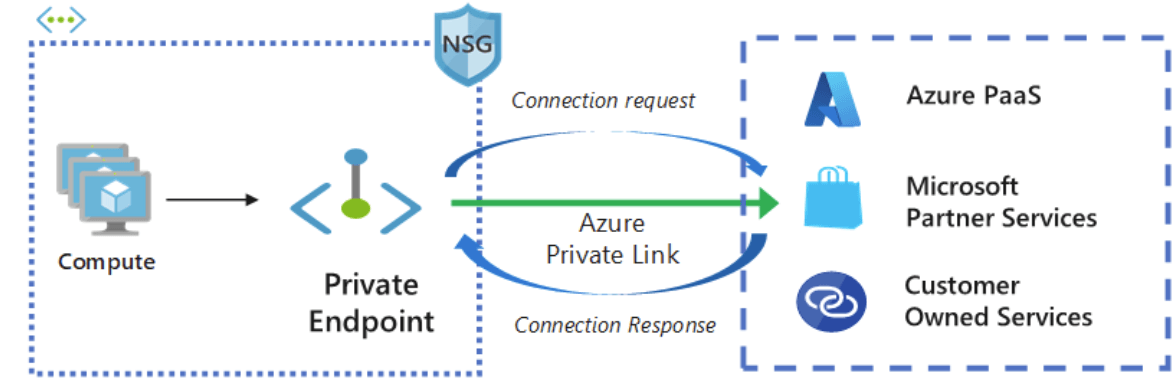
An Azure private endpoint is linked to an instance of a platform service in Azure, such as a key vault or storage account, and is deployed to a virtual network subnet. Resources in that virtual network (any subnet) can use that endpoint to connect to that service instance via the associated private IP address rather than the public IP address. Traffic remains within the virtual network.
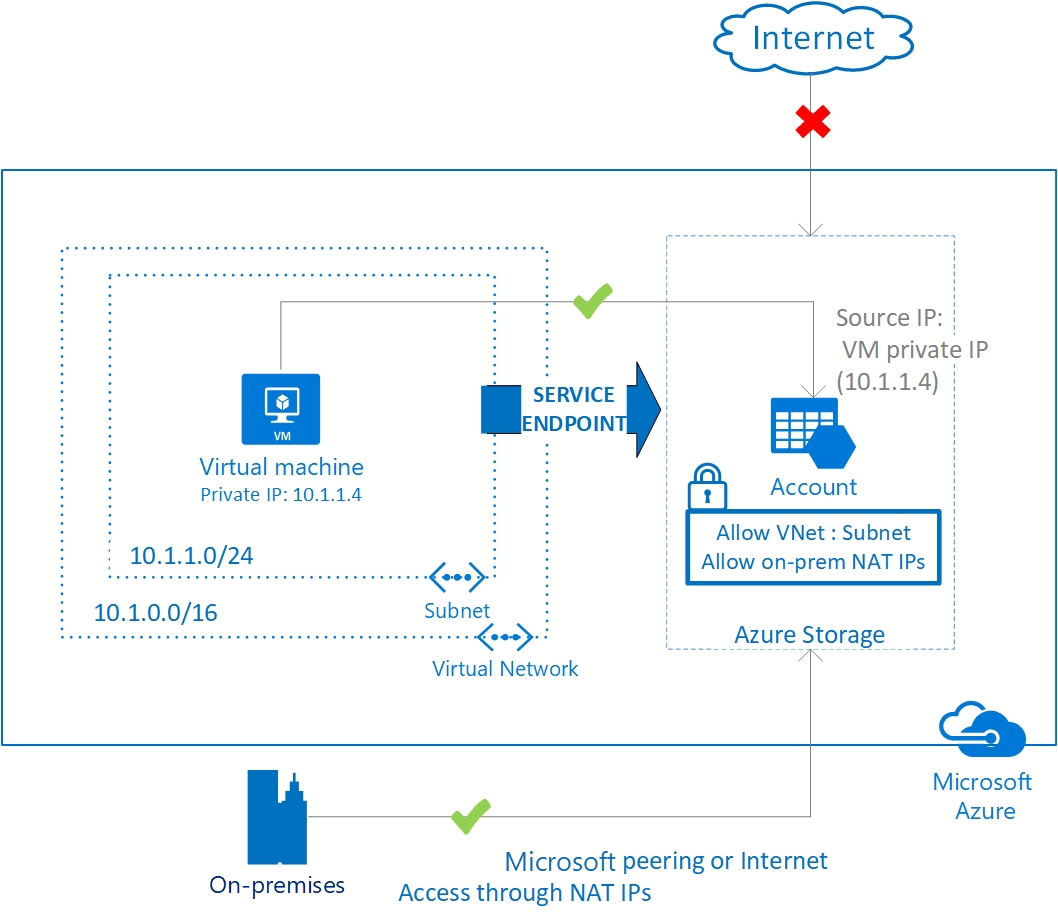
By contrast, a service endpoint is exclusive to the subnet where it is deployed. Resources in that subnet (and only that subnet) can use the endpoint to connect to any instance of that platform service (for example, any key vault) in the same tenant via the resource’s public endpoint. The approach uses the Microsoft Backbone Network rather than the public internet. Controlling which instance the service endpoint can access is handled at the resource level via the target resource’s firewall rules. Adding that subnet to the safelist allows traffic from that subnet while blocking traffic from other sources that have not been otherwise allowed.
When the Choice Doesn’t Matter
It should be stressed that the difference between the approaches is only minimally one of transit security. Both approaches keep traffic off the public internet, and in both cases, TLS termination occurs at the service boundary, so your traffic remains encrypted in transit along both routes. In terms of man-in-the-middle attack vulnerability, both would require an extreme level of insider access to Microsoft systems to intercept.
Both approaches also let you secure your platform services and grant access only to carefully defined sources. If your function app should be accessible only to Power Platform resources integrated into a particular subnet, for example, you can ensure that with either approach. Either deploy a single private endpoint (or two endpoints for regions with primary and failover subnets in the integration) and associated resources and block all public traffic, or safelist the subnet(s), automatically deploying service endpoints to them, and leave other traffic blocked. For the private endpoint scenario, do not deploy anything to your virtual network that you do not want to reach the private endpoint, or use network security controls to block those resources from accessing it.
The result of either is identical in terms of access to the service instance. Despite the wording of some Microsoft Learn materials in the past, disabling public access to your resource does not remove the public endpoint; it only sets the firewall to block all traffic. That is why you will get a 403 (Forbidden) response, not a 404 (Not Found), when trying to connect to such a resource. Anything not allowed by one of these methods will be denied access by the public firewall.
Nonetheless, there are meaningful distinctions between the two approaches, as we’ll see.
The Advantages of Service Endpoints
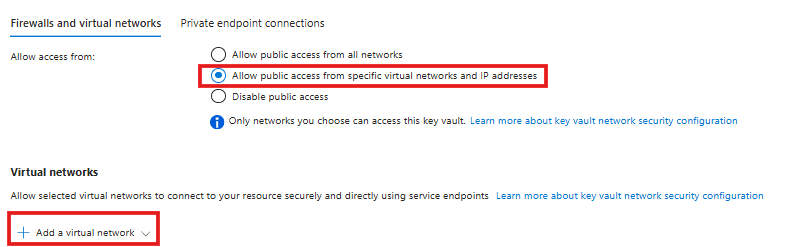
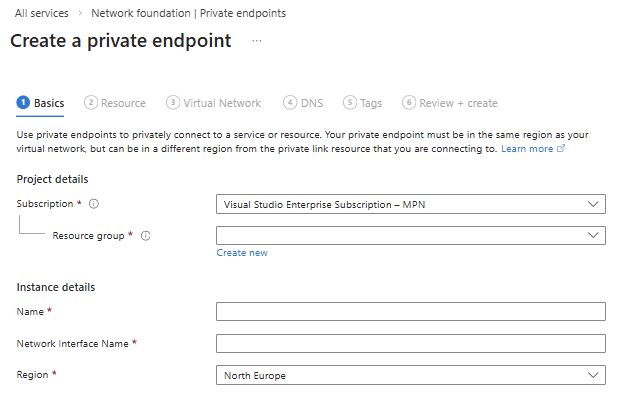
There are two key advantages to service endpoints. The first and most obvious is development effort. Adding a subnet to the platform service instance’s firewall in the Azure Portal will automatically deploy a service endpoint for that service to that subnet if none already exists (They can also be added manually). By contrast, private endpoints require a few more steps, more akin to a normal resource deployment process, and must be integrated into the network’s private DNS zone so resources can locate the endpoint and use it.
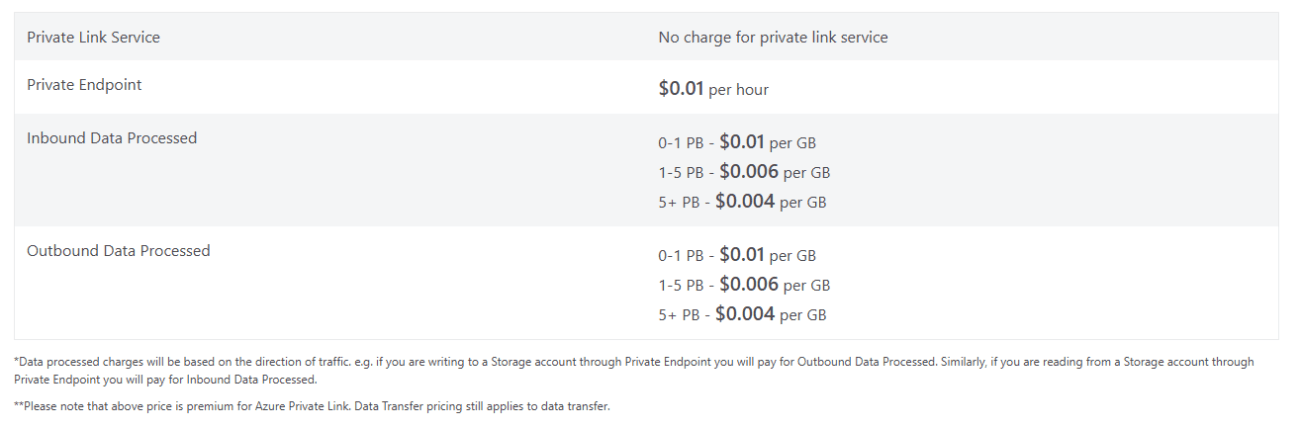
The second advantage is cost. Service endpoints add no additional cost to your deployment. On the other hand, private endpoints incur a charge of $0.01 per hour ($7-$8 per month), plus a starting cost of $0.01 per GB of data transferred (with discounts when sending more than 1 PB). How high this cost is will vary by service and how you use it, but if you’re just linking to a key vault, for example, to retrieve passwords securely, it is unlikely you’ll incur even a single GB of charges in a month. Other use cases, such as moving large volumes of data to and from a storage account, may incur significantly higher costs.
The Advantages of Private Endpoints
Private endpoints are the more advanced solution, requiring more cost and effort, but they pay their dividends in support, security, and governance.
Foremost among these considerations is that private endpoints are supported by a wider range of services than service endpoints. Third-party services like Snowflake often support only private endpoints. Likewise, Azure SQL Managed Instances, Azure App Service Environments, AKS private API servers, and so forth can be used via private endpoints but not service endpoints. If your solution involves a service that does not support service endpoints, the answer to which to use is clear: You have no choice but to use private endpoints. Otherwise, you still might use private endpoints for security or governance reasons.
While both offer highly secure transit for your data, Microsoft guarantees tenant-level logical networking isolation in transit for private endpoint communication, but not explicitly for service endpoint traffic (although it may be implied in some broader claims about data isolation in Azure). Service endpoints are designed for public-facing communication, and although the traffic will not traverse the internet, it is not guaranteed to avoid multitenant channels across the backbone network.
While both solutions effectively allow you to limit access to the resource instance, private endpoints also allow more nuanced control over that access and keep it specific to that instance. This occurs for two reasons. First, communication from within a subnet to a service endpoint in that subnet is not subject to NVA inspection, custom routing, private DNS isolation, etc. Network security groups apply, but they cannot distinguish between instances of the target service. Second, service endpoint connections allow access to the platform, not just a specific instance.
Those distinctions can matter. Virtual network security controls can provide in-depth control over how traffic reaches a private endpoint and how it is monitored. Service endpoints are not subject to these controls.
As for accessing the platform, rest assured that even with service endpoints, you can control which service endpoints can access which instance at the instance level. Your storage account, for example, can set firewall rules to allow access from certain subnets and exclude any not explicitly allowed. However, nothing prevents the subnet from accessing additional storage accounts once it has a relevant service endpoint. The example below shows how this can lead to shadow IT when the right combination of permissions is in place.
In this scenario, let’s assume you have a Power Platform environment that is integrated into two Azure virtual networks, each with a dedicated subnet. They use service endpoints in these subnets to connect to a designated Azure key vault to retrieve secrets needed for their automations. A developer in that environment has access to the environment and some Azure resources in another subscription, but they lack direct access to the approved vault or virtual networks. They want to add a new secret for a cloud flow to use. However, they don’t want to go through the effort of requesting access or having someone enter the secret into the vault. Nothing prevents them from creating a new key vault in the other subscription and adding the service endpoints for the Power Platform subnets to that vault’s firewall. If they have read access to the subnets, the endpoints will appear in the key vault UI even without write access. Even if they don’t have read access, they can still add it via the CLI if they know the service endpoint’s ARM ID. From there on, they can continue using their rogue key vault for Power Platform work, subverting the organization’s governance expectations. Remember: NSGs cannot determine which key vault is being accessed, so they cannot prevent this. This opening does not compromise the original key vault or directly hamper security, but it creates governance complications that can have downstream implications for security and organizational budgets.
Conclusion
So which wins? Overall, Microsoft’s recommendations are correct: When in doubt, a private endpoint is the safest option. However, cost-sensitive organizations or proof-of-concept development may benefit from the cost savings and ease of developing service endpoints. Azure architects need to decide the right tools on a case-by-case basis.