
Managed Apps vs. Power Apps Code Apps

First, Microsoft released App-skills for Copilot Cowork. It allows anyone to easily create managed apps (read previous post). Microsoft followed this up by introducing Microsoft Copilot Managed Runtime. Managed Runtime is the hosting platform behind apps created in Copilot Cowork, Copilot Code and Copilot Studio.
Both are absolutely crazy things in my opinion. When reading the announcements, It naturally raises questions about the future of Power Apps. Aren’t these managed applications doing exactly the same thing as Power Apps Code Apps? Both are TypeScript/React applications, which are practically coded by a language model. In both, the user is always identified (Entra ID) and data sources are used using managed Power Platform connectors.
So what exactly is the difference between them?
This time, let’s briefly go over the differences between the two.
Note! Managed apps are still very much in preview mode, so everything mentioned here is subject to change.
Who is the tool intended for?
I consider Power Apps Code Apps to be essentially a Power Platform developer/consultant tool. Using it requires installing all sorts of plugins on your workstation and, for example, a GitHub Copilot/Claude Code subscription. You have to organize the source codes yourself in Git.
Managed applications can be created directly with Copilot Cowork (hereinafter referred to as Copilot Code) and soon also with Copilot Studio. The user only needs a browser, a license and some Copilot Credits. This is true vibe coding for citizen developers.
But managed applications can also be made with other tools. Lovable was correctly mentioned separately in the announcement. So you can make an application with Lovable and finally bring it into the Microsoft environment for use. In that case, it is covered by all the management features built by Microsoft.
Developers and consultants can create managed applications, for example, using GitHub Copilot. They can also further develop an application created by a citizen developer on Cowork, for example, using GitHub Copilot.
Hosting environments
Code Apps run on a Power Apps host.
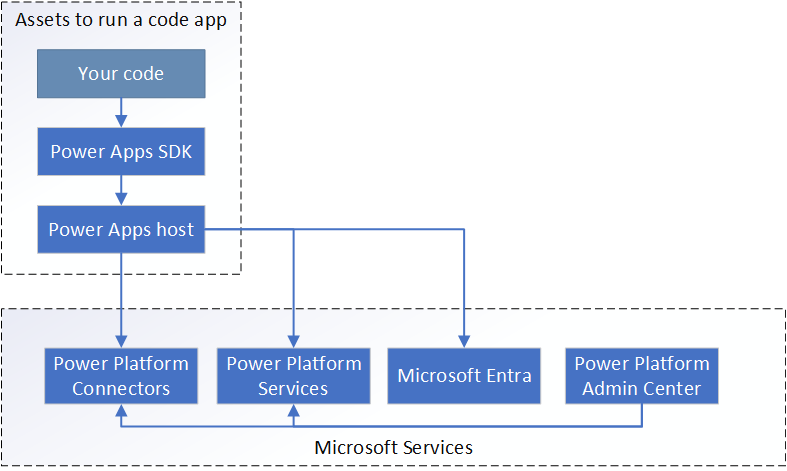
Practically at apps.powerapps.com/play/e/<environmentid>/app/<appid>?tenantId=<tenantid>

Managed applications are run on this new Copilot Managed Runtime host
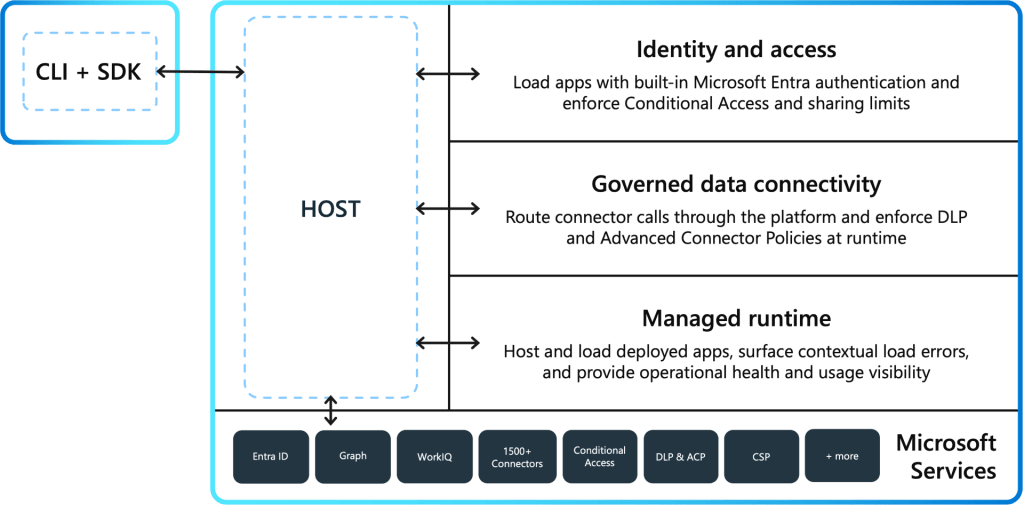
Practically at play.managedapps.cloud.microsoft/apps/

The whole idea of managed applications is that they can be built in many different ways. Also outside the Microsoft ecosystem, in which case they can be brought into this Microsoft managed environment for use by users in the organization. In this case, their use requires Entra ID authentication and data sources are used using connectors familiar from Power Platform. IT is provided with full visibility into the applications, as well as various control mechanisms for their creation and use.
App discoverability
I can find all the managed apps I create and those shared with me in one place (https://managedapps.cloud.microsoft/ )

There is no equivalent place for Power Apps Code Apps. They are typically published to several different environments and even then they can only be listed in them (https://make.powerapps.com/environments/<environmentid>/apps) if you have at least maker rights to the environment. Things are different on a phone. All Code Apps can be found (like other Power Apps) in the Power Apps application on your phone.
ALM (Application Lifecycle Management)
Power Apps Code Apps ALM relies on Power Platform ALM. The application is created on your own workstation, then imported into the Power Platform development environment and then into a test environment for testing. Once everything is verified to be working, it is exported to the production environment for everyone to use.
The pipeline can naturally be shorter
own machine -> test -> production
or longer
own machine -> development -> integration test -> test -> approval -> training -> production
Completely according to your needs.
You should take care of version control yourself. That is, you should move the Code Apps project that is on your own machine to Git. And remember to make commits, etc.
How does this work in managed applications?
Well, I don’t really know (yet). There aren’t any very accurate descriptions of how it works. But below are my own observations.
When you create a managed app, it will use your personal Power Platform development environment by default. The necessary Power Platform connections will be created there. If your app uses Dataverse, it will use your personal environment’s Dataverse.
So far, a managed application always uses the Dataverse environment, SharePoint site, or other data source that was configured during development. The platform does not yet appear to offer a way to switch those data sources during deployment. As a result, traditional Power Platform style ALM with separate development, test, and production environments does not currently seem to be supported.
The platform also does not (yet) offer a way to distribute (unreleased) changes to a group of users for testing. At least not in a way that the version being tested uses something other than the one used by the application in production. In practice, testing using a test database is still impossible.
But I wonder if this will soon be possible. Every managed app is backed by a Git repository, either platform-managed Git or a GitHub repository. That means we have all the features of Git at our disposal. This also allows Microsoft to independently perform various checks on the produced code.
Note that you can also use your own Git with managed apps when building them with your own tooling. Only GitHub Enterprise Cloud (GHE.com) and GitHub.com are currently supported.
Multiple developers?
Code Apps can naturally be worked on by multiple developers at the same time. As long as the source codes are properly there in Git…
It’s the same with managed applications. And because every managed app is automatically backed by a Git repository, this is actually easier. You just ask Copilot to share the application with a colleague and grant them editing rights. They can then make changes to it.

Licensing
The last and perhaps most interesting difference, however, is their licensing. Using Code Apps always requires a Power Apps Premium license. They can also be used with a Pay-as-you-go model, but in practice this is rarely possible (= economically attractive). 10$/user/month if the user opens the application once a month.
The Power Apps Premium license also covers the use of managed apps (up to certain limits). But if the user does not have a Power Apps Premium license, the use is purely consumption-based. And it consumes Copilot Credits. In practice, each API call made by the application consumes 0.1 Copilot Credit. Since one Copilot Credit is about $0.01, that is $0.001.

You can finally build a rarely used managed application for the entire organization, with Dataverse as the data store, and with very moderate licensing costs. In a situation where not all users in the organization have a Power Apps Premium license.
Summary
There are many similarities between these. But there are also differences. Code Apps will certainly be in the toolbox of Power Platform consultants for a long time to come. They can be easily moved from one environment to another along with other Power Platform artifacts. Not to mention Generative Pages, which is a very similar approach, but can be used natively in model-driven apps as a dialog, embedded in a form, etc. Something that managed applications are unlikely to be able to do.
If you don’t work with Power Platform at all, managed apps are probably your choice, provided you can live with their limitations.
As an easy-to-use vibe coding platform for an organization’s own people, managed applications are absolutely the best that (Microsoft) has to offer.
And this whole managed application concept is likely to attract significant interest from IT departments.