
Replacing Canvas Apps with Code Apps
Power Platform offers several different ways to build apps with AI. I particularly like code apps. But how do you get started? One great way to get started is to reimplement a familiar canvas app as a code app. At the same time, you can add features that were not possible with canvas apps at the time.
This time, let’s go through how such an exercise could proceed.
Utilizing an existing application as input data
We have an old canvas app that lets you edit rows in a single dataverse table in an Excel-style way. It’s not the most complex canvas app in the world, but if you’ve never done anything like it before, it can take an hour or two to do.

The table we are editing has quite a lot of columns. Let’s start by downloading the solution package (which contains the application) to our working folder. Then we open Github Copilot and ask it to document which Dataverse tables and columns are used in the application.
There is a solution package in this folder. It contains a Canvas app for updating values in a single table.
Please document the following:
Which table and columns are shown in the app (gallery).
Which of those columns are editable.
If the app shows values from other tables (lookup columns), also document those tables and the specific columns being used.

The end result is a document that shows which dataverse tables and their columns the application uses.

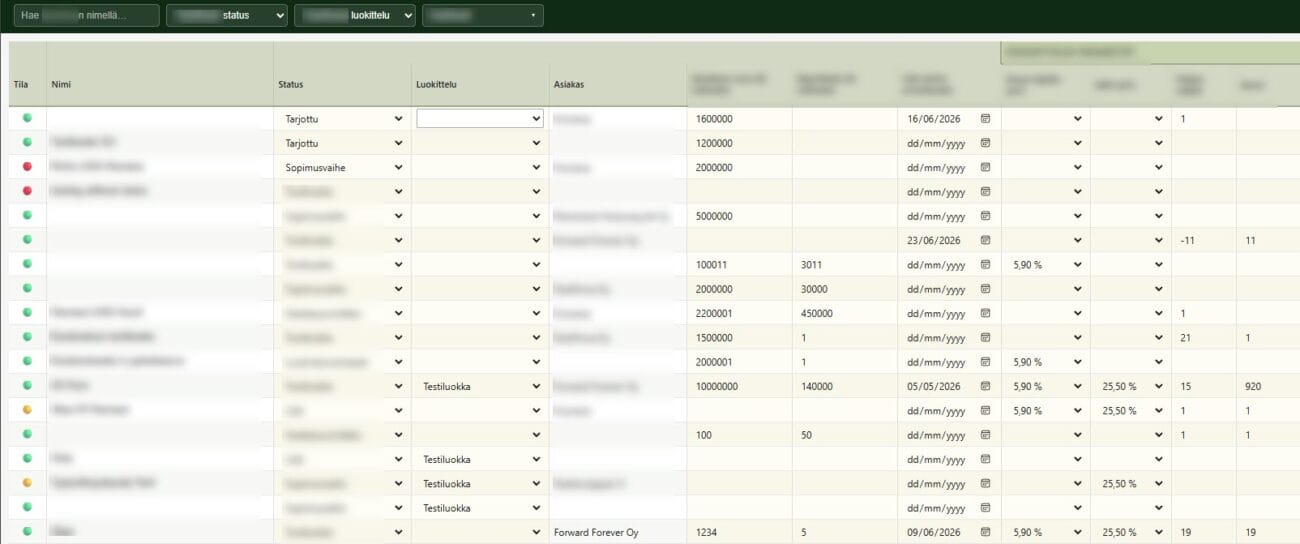
Let’s also add an image of the current application to the working directory.
Making a plan
Next, we ask the agent to write an implementation plan for the new code apps.
/plan I would like to create a code app that does the same thing as this Canvas app.
Can you write an implementation plan for it?
You already know which table the user is updating, which columns should be shown, and which columns are editable.
The old app has a separate “Save changes” button, but it would be better if changes were saved instantly.
The app needs to be responsive to different screen sizes.
You can find a Screenshot of the old app in this folder.
If you need more information about how the app should work, just ask.

The end result is a clear plan that can be iterated on with the agent to make it better. Of course, you can also edit the plan directly.
It is good to make a plan for several reasons. First, you can see what the agent is going to do and how. When making a plan, the agent will ask for more information if there is something that is unclear to it. If you just give the task to the agent (agent mode), it will make its own assumptions if it is not sure what and how it should do the job.
First implementation
Before we begin, we check which environment we are currently connected to. Just ask the copilot to list current connections.
list auth profiles
We are connected to the correct environment. We can continue.

Next, the agent is asked to create code apps based on the plan.
Use your power platform skill and build the first version of the code app according to this plan.
And it won’t take long. The first version looks like this. A largely fully functional application.

Exporting code to version control
The first version of the application has been made. From now on, its source code should be stored in version control. For example, on GitHub. We can ask Copilot to do this (too).
create private repository "Sample App - Editable Grid" and commit these files to there
Now the code is saved and we can revert to a specific old version if necessary. As long as we remember to check that version into version control.

A little fixes
A closer look reveals that all sorts of little things still need to be fixed:
- The symbol representing the status is not displayed. The agent did not understand that the column shows the status name. It is an emoji.
- The symbol that describes the column order is below the column name, not to the side.
- Alphabetical sorting works strangely. Empty names are in the middle of the order.
- The customer’s name is not displayed.
- Customers are also not displayed in the selection list at the top.
- At the top of the list there should be a separate heading “Pricing parameters” starting with the date field. This was in the original version (and in screenshot we provided).
- Editable fields should be visually distinguished from fields that cannot be edited.
- There could be some empty space around the list
- The selected category can no longer be removed.
- Making selections in the list is slow
- The application could show if the list has unsaved changes / is currently saving data
Tell the agent the desired changes in plan mode and let it plan the changes in peace.

Once the plan is complete, the agent is allowed to implement the changes.

After one round of revisions, the application is already complete. Unbelievable.

Code refactoring
We are happy with the end result. Finally, we ask the copilot to review the code and rewrite it better if necessary, if the agent deems this necessary.
Now the app is ready. please go through the whole codebase and refactor it if needed.

Copilot found several points in the code that it wanted to fix. We give it permission to make the changes and test that everything works after the fixes.
Finally, the agent is asked to export the updated files to github.
Documentation
It would also be a good idea to document the solution. The agent will do that too.
Generate comprehensive Developer documentation for this app
The agent wrote a light documentation in the project’s readme.md file. And (without asking or warning) took it to version control.

Had I given it permission to operate independently with GitHub in the previous steps? Maybe. It’s worth being careful when giving the agent permissions to perform actions with your credentials during a session.
Summary / notes
Recreating existing canvas apps as code apps is a great exercise. It’s easy to describe the application you’re creating, because the agent can study the code of the canvas app to see what kind of application is being sought. Especially when you give them the necessary number of screenshots from the old application in addition to the source code. This way, you can focus on everything else in the exercise instead of accurately describing the features.
I did this exercise twice. In the first versions of the application I made, the shortcomings were partly the same and partly different. This is part of the spirit of the game. Both times, the first version was already quite functional. Here too, it helped that I had the old application as a model and the agent knew exactly which tables and fields in the dataverse it should use.